28 June 2012

Windows messenger app for facebook Chat

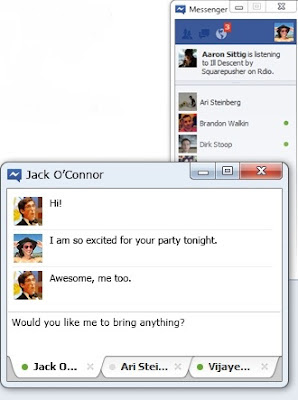
Windows messenger app ,Its a new messenger for windows app that lets you to chat from your desktop without opening Facebook whiling doing other stuffs or using other applications on your computer.

Here you can Chat and message with your friends on Facebook,See the latest updates from your friends in ticker and Get quick notifications about what’s going on

Procedure:

To try out the app, just complete a one-time setup. 
(Note: Messenger will automatically install updates.)

*Select the Install Messenger option
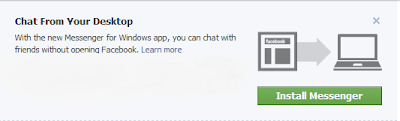


Now Save the file and Run the app

 Now enjoy the chat from  your desktop

When you download and open Messenger for the first time, you will be logged in automatically. From then on, you'll need to log in from the app and not from your browser.

Logging In
To log into Messenger

    Click on the icon in your Windows system tray
    Once the app opens, enter your email and password

Note
that when you click on messages, notifications or ticker items, you will be directed to your browser. If you aren't logged in, you’ll need to log into www.facebook.com to view this content.

Logging Out
To log out of Messenger

    Right-click on the icon in your Windows system tray icon in your Windows system tray and select Log out.

Privacy setting:

 The same preferences you’ve set in your privacy settings on www.facebook.com apply when you’re using the Facebook Messenger for Windows Desktop.

Procedure for uninstalling:


 Before uninstalling: If you have the app open, first exit the app by right-clicking the icon in your Windows task bar (by the clock) and choosing Exit.

    Go to Start > Control Panel > Uninstall a program

    Select Facebook Messenger from the list
    Confirm that you are sure and if prompted, choose to automatically close the app

If the app is still running after you uninstall it, just click Exit. The app won't be installed anymore.

                                                    * leave your feedback*

Source:Technoworld

Idea Free 3g plans working tested july 2012

Follow Simple Steps And get....

Send Message :     ACT3G750 to  12345

Affter some time You will get message ,that your 3g plan has been successfully activated
This trick working in 
 Karnataka , rajasthan etc..

Other Plans also Working
Try :
ACT3G43
ACT3G8
ACT3G650

If you like this trick  then comment here for and also subscribe me and click to like button  
you are also get our  updates on your mobile phone via free sms Alerts Type "Join HACKINGTECH" Without " " And Send "9219592195


-:Note :-

Try This  Trick At Low Balance

serch terms : free gprs tips , latest gprs tips , gprs tps 2012, idea gprs tips , idea 3g tips , idea free gprs tips june 2012, idea free gprs tips july 2012,idea free 3g gprs tips june 2012,idea free 3g  gprs tips july 2012

26 June 2012

How to Enable Delete Confirmation Dialog in Windows 8 ?

Most of the Window 8 UI elements like “low battery On Screen notification”, “full screen apps”, and auto run dialog box” have been renovated because of the flourished Metro bases panels, Ribbon Explorer and Start Menu. In dialogue box the most significant change is with the copy/move conflict resolution dialog box. It seems very elegant and spontaneous and it can also be handled easily from a single Window. One more noticeable change in Windows 8 is that it no longer asks for the confirmation while deleting a file or folder. It simple means that when you hit the delete button after selection some file then it automatically sends it to the Recycle Bin without any confirmation.

Other noticeable change is that Windows 8 no longer asks you to confirm the deletion of file and folder, i.e. when you select a file/folder and hit Delete key, it sends the respective item straight to Recycle Bin without confirming the action. So in this post you can learn that how you can easily bring the Windows 8’s default file/folder delete dialog box back.
  1. First you have to right click on the Recycle Bin and then choose Properties.
  2. Now in the dialog box enable the “Display delete” confirmation option.
  3. Now you have to hit OK for applying the changes.
  4. Now after this action your Delete action will prompt you for confirmation.

24 June 2012

Uninor Free GPRS Trick July 2012

Hello Friends Today I,m Provided New Tricks. .Uninor Free GPRS Trick May 2012


Make A New Profile -

Profile Name :- HackTechFreeGprs

APN               :- uninor 

Proxy             :- 10.58.10.58

Port                :- 8080

Homepage      :- wap.myuninor.in.php.t9space.com 

Save This Setting  And Enjoy Free Gprs  .If u Like This Trick Comment  Here Also Clcik And  Subscribe And  Like Our Facebook Page..

Serch terms : free gprs tips ,gprs tips ,latest gprs, new gprs, uninor gprs trick june 2012, gprs tips 2012, uninor gprs tips

Airtel Free GPRS Trick July 2012

Hello Friends m give you A new trick ,This trick is working in many states of India.plz comment if this this working your states..


Create New Settings In Your Mobile Phone

Access Point (Apn)=  airtelgprs.com

Proxy/IP=  216.155.153.105  Or  Ihide.info

Port = 80

Homepage =  http://203.115.112.5 or  http://122.170.122.214

Now just save the setting and restart your mobile phone and enjoy fast 3G free gprs data on your mobile and pc..I am also use this trick

If you like this trick  then comment here

Online Making Money for 10 Best Websites

So If I Tell You The 10 Best Websites For Making Money Online Then This Article Is Change Your Life And Helps You In Making More And More Money.


Elance is the best freelancing website without a doubt. It is a U.K based website that started in 1998. Not only is it the oldest and most popular, but is also the most highly paying website.
There are more than 1.5 million contractors registered with Elance! And they post more than 60k jobs per month!So many job options, and Elance's reliability and surety of payment via various methods verily make it the best freelancing website in the world! Elance does not charge you anything for signing up. But there is a paid package that unlocks many privileges for you. But my advice is, get a free membership, and work your way into the premium one.
(2)oDesk
oDesk is number two only because it isn't just as well known as Elance. But I don't think that's fair to the site. Quality-wise, it is one of the best websites. You can look for any sort of work at oDesk.
oDesk has all the features that Elance has. But there's got to be a reason why it isn't number one itself, right? Well, there is one. oDesk is slightly lower paid than Elance. Average rates for the same kind of jobs are lower on oDesk than on Elance, but still higher than many other websites. It's a slight difference though. Apart from that, oDesk is great. Indeed a must try for beginners.
Like Elance, Freelancer is also one of the oldest freelancing platforms. It is very popular, and has more than 3.6 million users! And it has a total job count of more than 1.6 million! 
It is a good paying website, with most of the Elance and oDesk features. It has some of the best payment options, which is useful for people who don't have PayPal access in their country.
Now here's an underdog that's made its way into the top 5. And rightly so! Compared to Elance, it's a very small platform. But it is dedicated to the Programming and IT field. 
So if you are looking for coding or other computer-related jobs, then this might be the thing for you! The fact that this is a small website makes it easier for you to get a job!ScriptLance charge only a 5% on all your earnings, which is the lowest by far! Plus, there's no sign up or registration fee. Better yet, it has an affiliate program that gives you bonuses whenever one of your friends join the site through you.
Fiverr is a different sort of Freelancing website. For one, it's the workers who post jobs they are willing to do, and not the hirers posting what they want done. For another, jobs can only cost $5, one dollar from which goes to Fiverr.. 
Be that as it may, Fiverr is a very unique website, probably one of its kind. It is a micro-freelancing site, which has mini-jobs called gigs. Workers post gigs they are willing to do. Contractors then order that gig. It is best for getting your freelancing career started. Not only will you find professional jobs here, you will also find some of the most ridiculous jobs and skids you ever saw in your life! It's a must try website, especially for beginners. So get ready to be amazed by Fiverr!
I think the name speaks for itself here. Guru really is a freelancing platform guru. It is also one of the most popular freelancing websites like Elance or oDesk. And it has many similar features. The only downside though, is that if you have a free account with them, then you get a very limited number of bids you can use per month. Kind of a mood killer for such a big website. But overall, it is a very good website. You can always try out other sites while working on this one. So sign up now and utilize your bids!
vWorker is another very reputable freelancing website. It is best known for its highly scrutinized screening process, which ensures that you only get jobs relevant to your own skills.
This saves a lot of time and effort, and if you want to hire, it will provide you with highly relevant people who can do the job well. A must try for all freelancers.


(8)99 Designs
This is a design-oriented freelancing website. Contractors post design contests of various types, such as logo designing, page designing etc. Freelancers need to submit their designs. The best design wins the contest, and bags a lot of money. 
This is sort of time consuming, and a bit risky especially for new freelancers. But if you are a good artist, and if you have the potential, then you can walk off with lots of money in your pocket. Interested?
As the name suggests, this website is related to programming, web development, and other IT related jobs. This is one of the oldest such websites. It has thousands of active contractors. So if you are into programming and such stuff, then this might be the thing for you. It pays really well too.
This website is very similar to 99 Designs. It works in a similar way too. But it pays more! Only problem though, is it is somewhat hard to get selected because there is a lot of competition. Still, it made it to out top 10 list.
I HOPE YOU LIKE MY POST.PLEASE LEAVE A COMMENT BELOW...

Mts Mblaze New Free Vpn Trick July 2012

Hello Friends Today I,m Provided New Tricks. Now Enjoy Unlimited Mts Mblaze Free Internet For 30 Days.

1:= First Download This Configure. FIles Download Config

2 = Then Register Tsunami Vpn Trial Account For 30 Days From This Link Register Here

3= Put Your User Name And Password In Config's Pass.txt File


And Enjoy Free Gprs  For 30 Days .If u Like This Trick Comment  Here


Free gprs tips ,free tips, free gprs tips june 2012, free gprs june, free gprs trick, new gprs trick,latest gprs trick 2012, latest gprs trick, 
free 3g gprs tricks

23 June 2012

Free Download Video Template Jazzy Tube For Blogger

There are lots of blog who provide video service, But they don't like good in post format. So for a good video blog today I am posting a template for blogger, I hope all you will like it. This is such a nice template you can see in screen shot or you can see demo also.


Download
 
Demo

Info of Template:

1. Designed - Maskolis
2. 4 columns template
3. Share Video on Youtube and Other Video sites
4. Post on homepage
5. Automatically detects the first screen from the video and displays as the image for the post.
6. Social share buttons are are also available.
7. Easy configuration of navigation and footer.

Subscribe via email

Enter your email address:

Delivered by FeedBurner

If your copyrighted material has been posted on FREEBESTTRICKS or if hyperlinks to your copyrighted material are returned through our search engine and you want this material removed, you must Send the infringement notice via email to suriyandigital@gmail.com Please allow up to a week for an email response.